Blog

  • machine-kvm2-driver

    This is developed using https://github.com/dhiltgen/docker-machine-kvm and https://github.com/kubernetes/minikube/tree/master/pkg/drivers/kvm

    docker-machine-kvm2

    KVM2 driver for docker-machine

    This driver leverages the new plugin architecture being
    developed for Docker Machine.

    Quick start instructions

    • Install libvirt and qemu-kvm on your system (e.g., sudo apt-get install libvirt-bin qemu-kvm)
      • Add yourself to the libvirtd group (may vary by linux distro) so you don’t need to sudo
    • Install docker-machine
    • Go to the
      releases
      page and download the docker-machine-driver-kvm binary, putting it
      in your PATH.
    • You can now create virtual machines using this driver with
      docker-machine create -d kvm myengine0.

    Build from Source

    $ yum install -y libvirt-devel curl git gcc  //CentOS,Fedora
    
    $ apt-get install -y libvirt-dev curl git gcc //Ubuntu
    
    $ make build
    

    Capabilities

    Images

    By default docker-machine-kvm uses a boot2docker.iso as guest os for the kvm hypervisior. It’s also possible to use every guest os image that is derived from boot2docker.iso as well.
    For using another image use the --kvm-boot2docker-url parameter.

    Dual Network

    • eth1 – A host private network called docker-machines is automatically created to ensure we always have connectivity to the VMs. The docker-machine ip command will always return this IP address which is only accessible from your local system.
    • eth0 – You can specify any libvirt named network. If you don’t specify one, the “default” named network will be used.
      • If you have exotic networking topolgies (openvswitch, etc.), you can use virsh edit mymachinename after creation, modify the first network definition by hand, then reboot the VM for the changes to take effect.
      • Typically this would be your “public” network accessible from external systems
      • To retrieve the IP address of this network, you can run a command like the following:
      docker-machine ssh mymachinename "ip -one -4 addr show dev eth0|cut -f7 -d' '"

    Driver Parameters

    Here are all currently driver parameters listed that you can use.

    Parameter Description
    –kvm-cpu-count Sets the used CPU Cores for the KVM Machine. Defaults to 1 .
    –kvm-disk-size Sets the kvm machine Disk size in MB. Defaults to 20000 .
    –kvm-memory Sets the Memory of the kvm machine in MB. Defaults to 1024.
    –kvm-network Sets the Network of the kvm machinee which it should connect to. Defaults to default.
    –kvm-boot2docker-url Sets the url from which host the image is loaded. By default it’s not set.
    –kvm-cache-mode Sets the caching mode of the kvm machine. Defaults to default.
    –kvm-io-mode-url Sets the disk io mode of the kvm machine. Defaults to threads.


    Visit original content creator repository

  • perforce-commit-discord-bot

    Perforce Commit Logger Discord Bot 🗒️ ✏️

    Build Status Issues

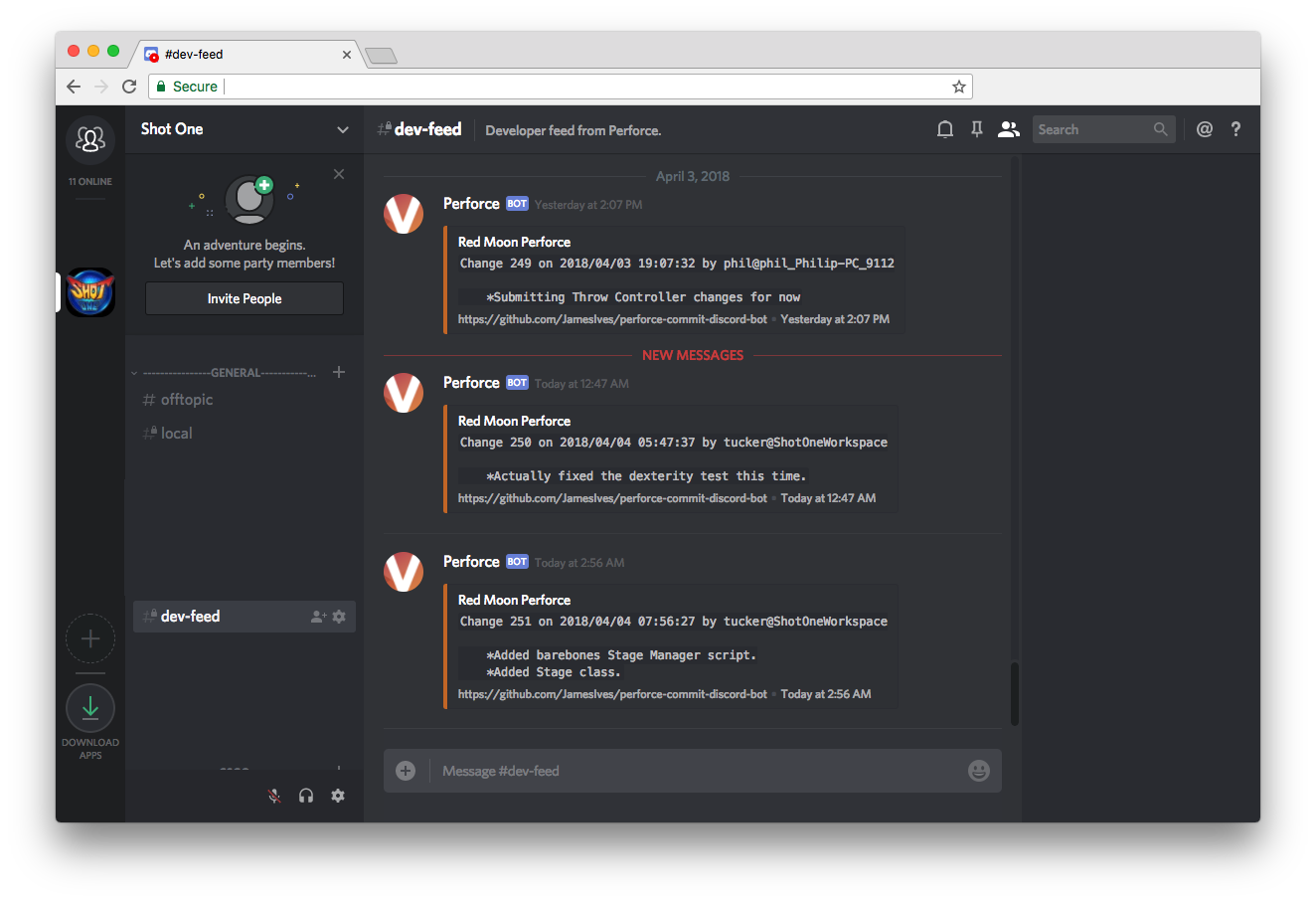
    With this bot you’re able to keep track of commits made to a Perforce version control server within a Discord channel.

    Installation Steps 💽

    1. Within your Discord server go to the settings for the channel you’d like the commit logs to be posted to and copy the webhook URL.
    2. Save the webhook URL as an environment variable called DISCORD_WEBHOOK_URL.
    3. The service requires access to the p4 changes command in the terminal, your bot should be installed somewhere where it can automatically perform this command without the session expiring. Once suitable access has been provided you’ll need to run $ pip install -r requirements.txt followed by $ python app.py to initialize it.
    4. Optionally you should consider creating a CRON script or something similar that restarts the app.py file on server reboot in order to keep the bot alive.

    Unit tests can be run using the $ python tests.py command.

    Getting Started ✈️

    Every thirty seconds the bot runs a Perforce command in the terminal that checks for the most recent changes. If it finds one it stores it in memory, if the change it finds is the same as the one it gathered previously then it discards it. You’ll need to provide the bot with access to your servers Perforce command line. One way of doing this is running the Python application on the server which hosts your Perforce instance. If you can type p4 changes yourself then the bot will be able to do its thing.

    Configuration 📁

    The installation will require you to enter a number of settings as environment variables. Below you’ll find an explanation of each.

    Key Value Information Required
    DISCORD_WEBHOOK_URL The Webhook URL for the Discord channel you’d like the bot to post its messages to. Yes

    Example

    Visit original content creator repository
  • bin

    Short scripts, which do not belong to my dotfiles. Unless otherwise stated,
    these files are in the public domain.

    List:

    Visit original content creator repository

  • Urdu-Text-Preprocessing

    Hi, I’m MD Ryhan! 👋

    Urdu Text Preprocesing Task

    Urdu text preprocessing is an important step in natural language processing that involves cleaning, normalizing, and transforming raw Urdu text data into a form that can be analyzed by machines. In Python, there are various libraries and tools available for Urdu text preprocessing that can be used to perform tasks such as tokenization, lemmatization, stop word removal, normalization, and more.

    Here is a brief overview of some of the common Urdu text preprocessing tasks that can be performed in Python:

    • Tokenization: Tokenization involves splitting a piece of text into individual words or tokens. This is an important step in text analysis because it provides a basic unit of analysis that can be used to count occurrences of words, perform sentiment analysis, and more. Urdu text can be tokenized using libraries such as Urduhack, spaCy, and NLTK.

    • Urdu Stopword removal: Removing words that occur frequently in a language and are unlikely to carry any useful information for text classification.

    • Urdu Text Lemmatization: Lemmatization can be an important step in Urdu text preprocessing, as it can help to reduce the number of unique words in a corpus and improve the accuracy of natural language processing models.

    • Hashtag, HTML tag, mention, punctuation, number, and URL removal: Removing all the hashtags, HTML tags, mentions, punctuations, numbers, and URLs from the text.

    • Part-of-speech tagging:: Part-of-speech (POS) tagging involves identifying the grammatical parts of speech of each word in a sentence, such as nouns, verbs, and adjectives. POS tagging can be performed using libraries such as Urduhack,stanza and spaCy.

    • Count POS Tag: The output of the ud_pos_tag() function is a list of tuples, where each tuple contains a word and its corresponding POS tag. We then use the Counter() function from the collections library to count the frequency of each POS tag in the text.

    Overall, Urdu text preprocessing in Python involves a combination of these tasks to transform raw text data into a form that can be analyzed by natural language processing models. The choice of preprocessing tasks will depend on the specific NLP task at hand, as well as the quality and complexity of the input text data.

    🚀 About Me

    I’m a data scientist with a specialization in Natural Language Processing (NLP). I have experience working on NLP projects and conducting research in this field.

    As an NLP researcher, I have expertise in a variety of NLP techniques such as text classification, sentiment analysis, named entity recognition, and text summarization.

    🔗 Links

    portfolio

    linkedin

    Visit original content creator repository
  • gotoolbox

    gotoolbox

    A kitchen sink of Go tools that I’ve found useful. Uses only the standard library, no external dependencies.

    contents

    example usage

    go get github.com/jritsema/gotoolbox
    

    utilities

    package main
    
    import "github.com/jritsema/gotoolbox"
    
    func main() {
    
    	s := []string{"a", "b", "c"}
    	if gotoolbox.SliceContainsLike(&s, "b") {
    		fmt.Println("b exists")
    	}
    
    	err := gotoolbox.Retry(3, 1, func() error {
    		return callBrittleAPI()
    	})
    	if err != nil {
    		fmt.Println("callBrittleAPI failed after 3 retries: %w", err)
    	}
    
    	f := "config.json"
    	if !gotoolbox.IsDirectory(f) && gotoolbox.FileExists(f) {
    		config, err := gotoolbox.ReadJSONFile(f)
    		if err != nil {
    			fmt.Println("error reading json file: %w", err)
    		}
    	}
    
    	value := gotoolbox.GetEnvWithDefault("MY_ENVVAR", "true")
    
    	command := exec.Command("docker", "build", "-t", "foo", ".")
    	err = gotoolbox.ExecCmd(command, true)
    	if err != nil {
    		fmt.Println("error executing command: %w", err)
    	}
    
    	var data interface{}
    	err = gotoolbox.HttpGetJSON("https://api.example.com/data.json", &data)
    
    	err = gotoolbox.HttpPutJSON("https://api.example.com/data.json", data)
    
    	var res Response
    	err = gotoolbox.HttpPostJSON("https://api.example.com/data.json", data, &res, http.StatusCreated)
    }

    web package

    package main
    
    import (
    	"embed"
    	"html/template"
    	"net/http"
    	"github.com/jritsema/gotoolbox/web"
    )
    
    var (
    	//go:embed all:templates/*
    	templateFS embed.FS
    	html *template.Template
    )
    
    type Data struct {
    	Hello string `json:"hello"`
    }
    
    func index(r *http.Request) *web.Response {
    	return web.HTML(http.StatusOK, html, "index.html", Data{Hello: "world"}, nil)
    }
    
    func api(r *http.Request) *web.Response {
    	return web.DataJSON(http.StatusOK, Data{Hello: "world"}, nil)
    }
    
    func main() {
    	html, _ = web.TemplateParseFSRecursive(templateFS, ".html", true, nil)
    	mux := http.NewServeMux()
    	mux.Handle("/api", web.Action(api))
    	mux.Handle("https://github.com/", web.Action(index))
    	http.ListenAndServe(":8080", mux)
    }

    development

    
    Choose a make command to run
    
    vet vet code
    test run unit tests
    build build a binary
    autobuild auto build when source files change
    start build and run local project


    Visit original content creator repository

  • nedextract

    github repo badge github license badge RSD fair-software.eu Build Coverage Status cffconvert markdown-link-check OpenSSF Best Practices DOI

    Nedextract

    nedextract is being developed to extract specific information from annual report PDF files that are written in Dutch. Currently it tries to do the following:

    • Read the PDF file, and perform Named Entity Recognition (NER) using Stanza to extract all persons and all organisations named in the document, which are then processed by the processes listed below.

    • Extract persons: using a rule-based method that searches for specific keywords, this module tries to identify:

      • Ambassadors

      • People in important positions in the organisation. The code tries to determine a main job description (e.g. director or board) and a sub-job description (e.g. chairman or treasurer). Note that these positions are identified and outputted in Dutch.
        The main jobs that are considered are:

        • directeur
        • raad van toezicht
        • bestuur
        • ledenraad
        • kascommissie
        • controlecommisie.

        The sub positions that are considered are:

        • directeur
        • voorzitter
        • vicevoorzitter
        • lid
        • penningmeester
        • commissaris
        • adviseur

      For each person that is identified, the code searches for keywords in the sentences in which the name appears to determine the main position, or the sentence directly before or after that. Subjobs are determine based on words appearing directly before or after the name of a person for whom a main job has been determined. For the main jobs and sub positions, various ways of writing are considered in the keywords. Also before the search for the job-identification starts, name-deduplication is performed by creating lists of names that (likely) refer to one and the same person (e.g. Jane Doe and J. Doe).

    • Extract related organisations:

      • After Stanza NER collects all candidates for mentioned organisations, postprocessing tasks try to determine which of these candidates are most likely true candidates. This is done by considering: how often the terms is mentioned in the document, how often the term was identified as an organisation by Stanza NER, whether the term contains keywords that make it likely to be a true positive, and whether the term contains keywords that make it likely to be a false positive. For candidates that are mentioned only once in the text, it is also considered whether the term by itself (i.e. without context) is identified as an organisation by Stanza NER. Additionally, for candidates that are mentioned only once, an extra check is performed to determine whether part of the candidate org is found to be a in the list of orgs that are already identified as true, and whether that true org is common within the text. In that case the candidate is found to be ‘already part of another true org’, and not added to the true orgs. This is done, because sometimes an additional random word is identified by NER as being part of an organisation’s name.
      • For those terms that are identified as true organisations, the number of occurrences in the document of each of them (in it’s entirety, enclosed by word boudaries) is determined.
      • Finally, the identified organisations are attempted to be matched on a list of provided organisations using the anbis argument, to collect their rsin number for further analysis. An empty file ./Data/Anbis_clean.csv is availble that serves as template for such a file. Matching is attempted both on currentStatutoryName and shortBusinessName. Only full matches (independent of capitals) and full matches with the additional term ‘Stichting’ at the start of the identified organisation (again independent of capitals) are considered for matching. Fuzzy matching is not used here, because during testing, this was found to lead to a significant amount of false positives.
    • Classify the sector in which the organisation is active. The code uses a pre-trained model to identify one of eight sectors in which the organisation is active. The model is trained on the 2020 annual report pdf files of CBF certified organisations.

    Prerequisites

    1. Python 3.8, 3.9, 3.10, 3.11
    2. Poppler; poppler is a prerequisite to install pdftotext, instructions can be found here: https://pypi.org/project/pdftotext/. Please note that to install poppler on a Windows machine using conda-forge, Microsoft Visual C++ build tools have to be installed first.

    Installation

    nedextract can be installed using pip:

    pip install nedextract

    The required packages that are installed are: FuzzyWuzzy, NumPy, openpyxl, poppler, pandas, pdftotext, python-Levenshtein, scikit-learn, Stanza, and xlsxwriter.1

    Usage

    Input

    The full pipeline can be executed from the command line using: python3 -m nedextract.run_nedextract Followed by one or more of the following arguments:

    • Input data, one or more pdf files, using one of the following arguments:
      • -f file: path to a single pdf file
      • -d directory: path to a directory containing pdf files
      • -u url: link to a pdf file
      • -uf urlf: text file containing one or multiple urls to pdf files. The text file should contain one url per line, without headers and footers.
    • -t tasks (optional): can either be ‘people’, ‘orgs’, ‘sectors’ or ‘all’. Indicates which tasks to be performed. Defualts to ‘people’.
    • -a anbis (option): path to a .csv file which will be used with the orgs task. The file should contain (at least) the columns rsin, currentStatutoryName, and shortBusinessName. An empty example file, that is also the default file, can be found in the folder ‘Data’. The data in the file will be used to try to match identified named organisations on to collect their rsin number provided in the file.
    • model (-m), labels (-l), vectors (-v) (optional): each referring to a path containing a pretraining classifyer model, label encoding and tf-idf vectors respectively. These will be used for the sector classification task. A model can be trained using the classify_organisation.train function.
    • -wo write_output: TRUE/FALSE, defaults to TRUE, setting weither to write the output data to an excel file.

    For example: python3 -m nedextract.run_nedextract -f pathtomypdf.pdf -t all -a ansbis.csv

    Returns:

    Three dataframes, one for the ‘people’ task, one for the ‘sectors’ task, and one for the ‘orgs’ task. If write_output=True, the gathered information is written to auto-named xlsx files in de folder Output. The output of the different tasks are written to separate xlsx files with the following naming convention:

    • ‘./Output/outputYYYYMMDD_HHMMSS_people.xlsx’
    • ‘./Output/outputYYYYMMDD_HHMMSS_related_organisations.xlsx’
    • ‘./Output/outputYYYYMMDD_HHMMSS_general.xlsx’

    Here YYYYMMDD and HHMMSS refer to the date and time at which the execution started.

    Turorials

    Tutorials on the full pipeline and (individual) useful analysis tools can be found in the Tutorials folder.

    Contributing

    If you want to contribute to the development of nedextract, have a look at the contribution guidelines.

    How to cite us

    DOI RSD

    If you use this package for your scientific work, please consider citing it as:
    Ootes, L.S. (2023). nedextract ([VERSION YOU USED]). Zenodo. https://doi.org/10.5281/zenodo.8286578
    See also the Zenodo page for exporting the citation to BibTteX and other formats.

    Credits

    This package was created with Cookiecutter and the NLeSC/python-template.

    Footnotes

    1. If you encounter problems with the installation, these often arise from the installation of poppler, which is a requirement for pdftotext. Help can generally be found on pdftotext.

    Visit original content creator repository
  • forgefed

    ForgeFed

    Get it on Codeberg

    ForgeFed is an ActivityPub-based federation protocol for software forges. You can read more about ForgeFed and the protocol specification on our website.

    Contributing

    There’s a huge variety of tasks to do! Come talk with us on the forum or chat. More eyes going over the spec are always welcome! And feel free to open an issue if you notice missing details or unclear text or have improvement suggestions or requests.

    However, to maintain a manageable working environment, we do reserve the issue tracker for practical, actionable work items. If you want to talk first to achieve more clarity, we prefer you write to us on the forum or chat, and opening an issue may come later.

    If you wish to join the work on the ForgeFed specification, here are some technical but important details:

    • We don’t push commits to the main branch, we always open a pull request
    • Pull requests making changes to the specification content must have at least 2 reviews and then they wait for a cooldown period of 2 weeks during which more people can provide feedback, raise challenges and conflicts, improve the proposed changes etc.
    • If you wish to continuously participate in shaping the specification, it would be useful to go over the open PRs once a week or so, to make sure you have a chance to communicate your needs, ideas and thoughts before changes get merged into the spec

    Important files in this repo to know about:

    • The file resources.md lists which team members have access to which project resources, openness and transparency are important to us!
    • The actual specification source texts are in the spec/ directory
    • JSON-LD context files are in the rdf/ directory

    Repo mirrors

    Website build instructions

    The ForgeFed website is generated via a script using the Markdown files in this repository. See ./build.sh for more details.

    License

    All contents of this repository are are freely available under the CC0 1.0 Universal (CC0 1.0) Public Domain Dedication.

    The ForgeFed logo was created by iko.

    Historical resources

    ForgeFed started its life on a mailing list. The old ForgeFed forum at talk.feneas.org can be viewed via the Internet Archive’s Wayback Machine.

    Funding

    This project is funded through the NGI Zero Entrust Fund, a fund established by NLnet with financial support from the European Commission’s Next Generation Internet program. Learn more at the NLnet project page.

    NLnet foundation logo NGI Zero Entrust Logo

    Visit original content creator repository
  • Nextjs-Dashboard

    Nextjs-Dashboard

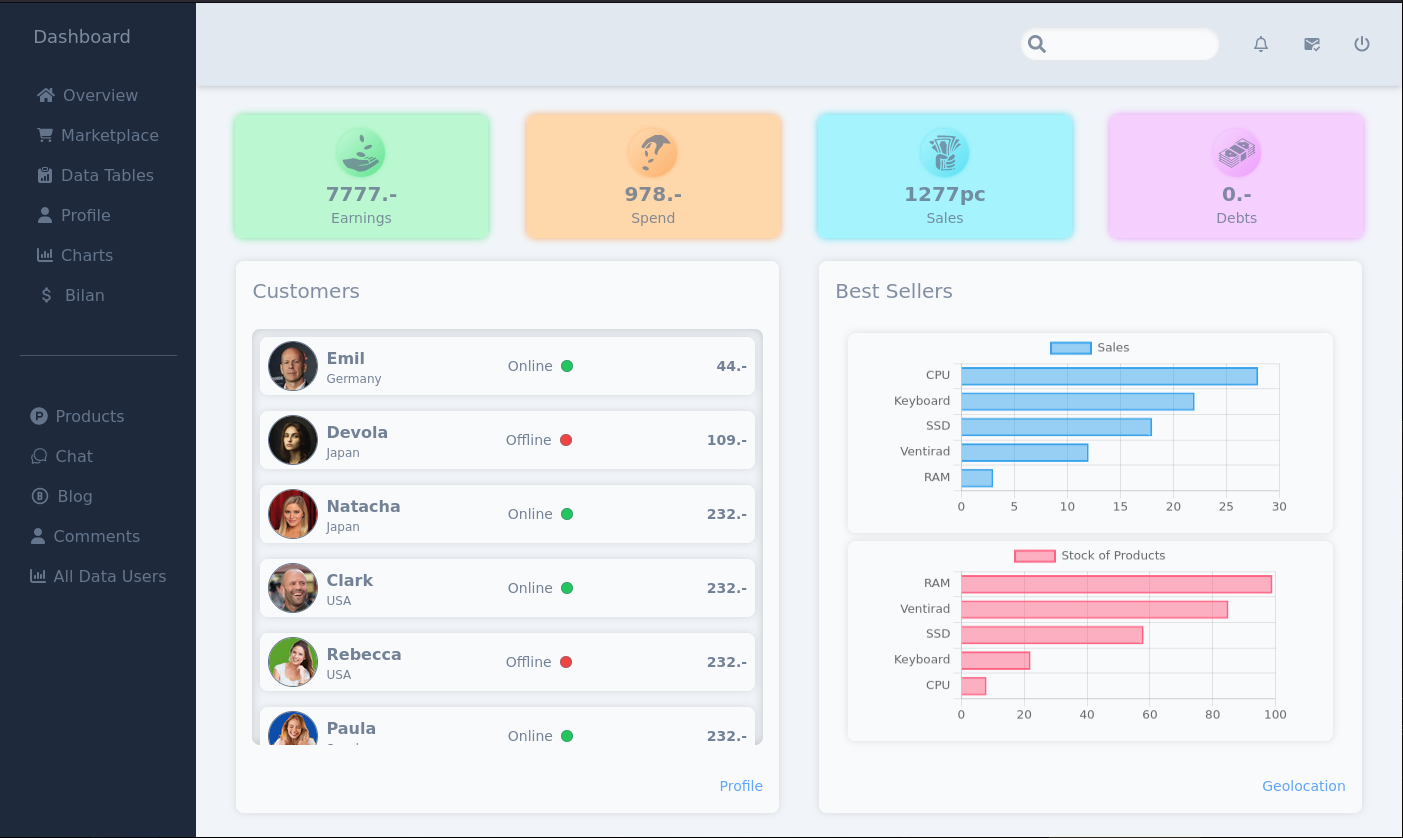
    Handicraft Dashboard

    Nextjs 15 (rc) – TypeScript – Tailwind – PostgreSQL

    Dashboard Img

    Introduction

    Although this application seems complete, I focused on the administrator dashboard features, in order to create something both useful and original. I also used NextAuth v5 to see how it’s possible to log in as both user and administrator. In the real world, you’d have to use Lucia instead.

    I’m interested in :

    • capturing the public IP and then using it for geolocation.
    • how to retrieve users’ browser and os system data and display them in graphs.

    Display :

    • product stocks in order from smallest to largest.
    • connected users.
    • messages, connections and sales by day, month and year.
    • tasks set by administrators on all pages of the application.

    Goals

    Login as User or Admin with NextAuth V5 without api (GitHub & Google)

    • Administrator can access to dashboard.
    • User & Admin can access to products & payment.

    User:

    • main page
    • products
    • contact (possibility to send message to admin)

    Admin:

    • main page
    • dashboard

    Dashboard with multiple management system:

    • message
    • statistics
    • users
    • products (best sellers & stock)
    • bilan

    Fetch the public IP from user

    Retrieve the public IP & determine the location by latitude & longitude with react-leaflet map.

    https://jsonip.com/

    Fetch to retrieve latitude & longitude with SECRET_API_KEY & publicIp to customize url, such as:

    https://api.ip2location.io/?key=${SECRET_API_KEY}&ip=${publicIp}

    (You can use the api free of charge with https://www.ip2location.io/).

    I had some problems, many times, with a window is undefined error. To solve this problem in my RSC (React Server Component), I simply added :

    export const dynamic = "force-dynamic";

    Data are displayed under Network link in Dashboard.


    Retrieve Browser & OS from users

    Display them to user & write them into a file

    Useful link: window.navigator.userAgent

    Data are written into:

    • /app/api/profile/browseros/route.ts

    Data are saved into:

    • /utils/browseros-data.json
    • /utils/ip-data.json

    Data are displayed in charts

    • components/menu-items/graphs/BarChartBrowser.tsx
    • components/menu-items/graphs/BarChartOs.tsx

    Manage products from store as ADMIN with server-actions & postgresql (prisma)

    dashboard (admin)

    1. Upadate/Modify
    2. Delete
    3. Create
    • /components/menu-items/admin-products/ModifyProduct.tsx
    • /components/menu-items/admin-products/CreateProduct.tsx

    (They have the same route)


    Messages

    User can send message to Admin & management system message for Admin

    contact (user)

    • Write & send a message to admin.

    dashboard (admin)

    • Open/close messages
    • Read & write message to response to users.

    Data

    Retrieve data from db & data.json to display values in charts

    dashboard (admin)

    • Messages
    • Network
    • Statistics (nb connection to site per day, os, browser, satisfaction)
    • Store of products (create – delete – update)
    • Bilan

    Configuration in .env

    POSTGRES_HOST=127.0.0.1
    POSTGRES_PORT=PPPPPPPPP
    POSTGRES_USER=UUUU
    POSTGRES_PASSWORD=XXXX
    POSTGRES_DB=DBDBDBD
    
    DATABASE_URL="postgresql://UUUU:XXXX@localhost:PPPPPPPPP/DBDBDBD?schema=public"
    
    # use: "openssl rand -base64 32"
    AUTH_SECRET="result of cmd above"
    NEXTAUTH_URL=http://localhost:3000
    
    # build mode require this setting:
    AUTH_TRUST_HOST=true
    

    Don’t forget to configure .gitignore to avoid share sensitive data.

    add .env into .gitignore & save the file.


    Authentication with next-auth@beta

    I wanted build a system login without external API like Google or GitHub to give different access as user or admin.

    All files that include NextAuth V5:

    • app/api/auth/[…nextauth]/route.ts
    • /app/auth/…
    • middleware.ts
    • prisma/prisma.ts

    Security

    Use next-safe-action with zod & zod-form-data, to secure request of server action (avoid to display sensitive data). It’s interacts with the middleware.

    • /lib/actions.ts
    • /lib/safe-action.ts

    Extra

    I create a shop as an e-commerce to combine zustand with prisma request. Just to understand how works prisma table (in this ctx) & how to initialize products in the zustand store. I don’t used stripe, because that wasn’t my goal.


    Installation

    $ pnpm add sharp

    $ pnpm add react-icons

    $ pnpm tailwindcss-animate

    $ pnpm add chart.js react-chartjs-2

    $ pnpm add leaflet

    $ pnpm add react-leaflet

    (not required @types/react-leaflet = deprecated)

    $ pnpm add zustand

    $ pnpm add @tanstack/react-query

    $ pnpm add @tanstack/react-query-devtools

    $ pnpm add jsonwebtoken

    $ pnpm add @types/jsonwebtoken

    $ pnpm add react-hook-form

    $ pnpm add zod @hookform/resolvers

    $ pnpm add zod-form-data

    $ pnpm add @hookform/error-message

    $ pnpm add next-auth@beta @auth/prisma-adapter

    $ pnpm add @prisma/client

    $ pnpm add -D prisma

    $ pnpm prisma init --datasource-provider postgresql

    (create db & table with PostgreSQL)

    $ pnpm prisma migrate dev --name init

    (pnpm prisma db push (schema))

    (pnpm prisma db seed (seed.ts))

    $ pnpm add bcryptjs

    $ pnpm add -D @types/bcryptjs

    $ pnpm add react-hot-toast

    $ pnpm add next-safe-action

    Video Youtube

    IMAGE ALT TEXT HERE

    Ref

    • NextAuth V5:

    auth.ts

    • If you get some trouble with prisma migration schema, follow this link:

    prisma-migrate


    Enjoy it ! 🐨:

    Visit original content creator repository
  • elastic-alexa

    Elasticsearch Alexa skill

    Skill for Amazon echo to enable Alexa to talk to Elasticsearch.

    Current possible interaction

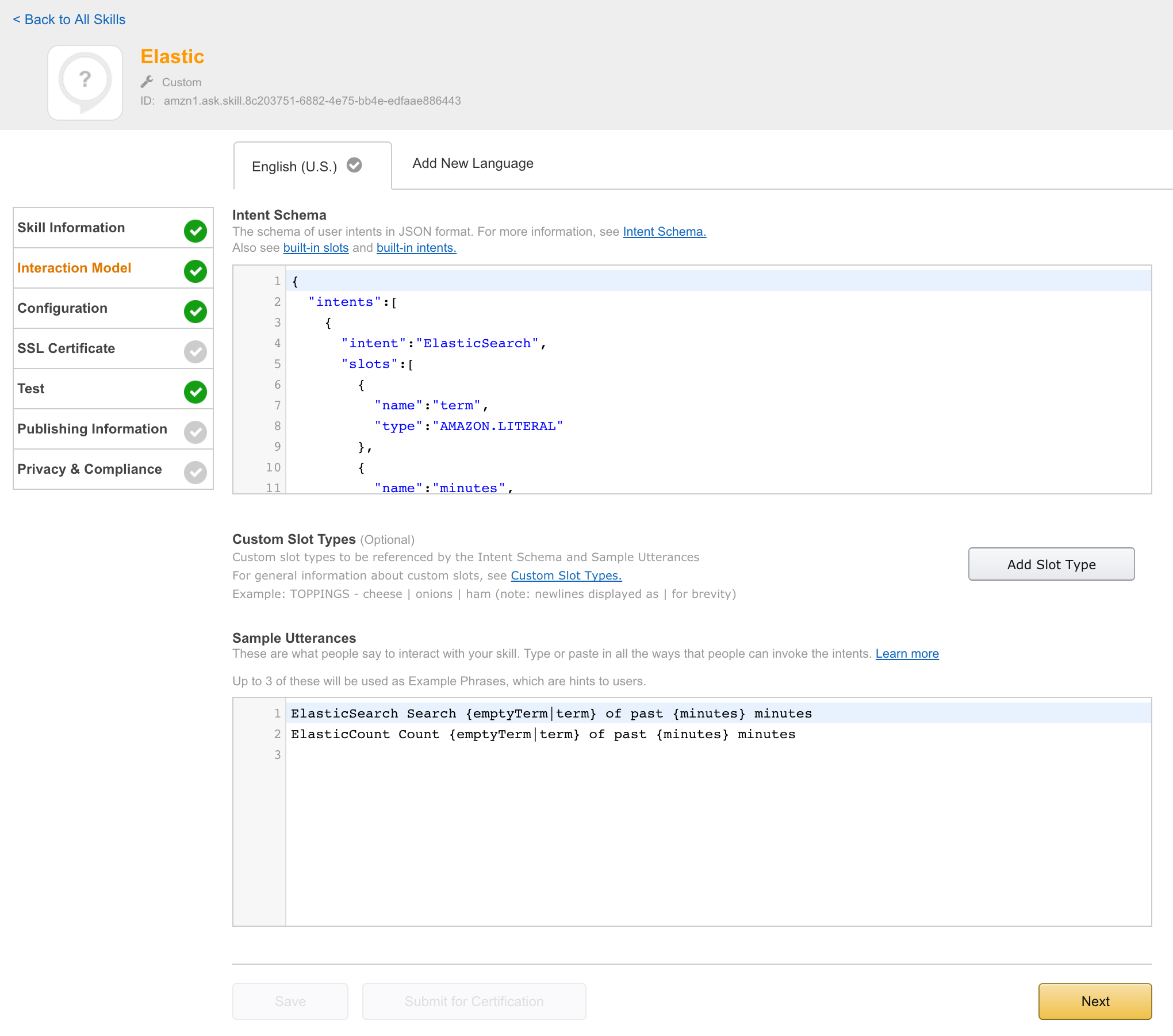
    Configured IntentSchema:

    ElasticCount Count {emptyTerm|term}
    

    Explanation:

    1. Search for term in elasticsearch and count result set

    Example:

    Alexa? Ask Elastic to count error
    

    is transformed to skill (intent) and variable configuration (slots):

    intent=ElasticSearch
    slot(term)=error
    

    Note: Data type number can be translated from five to 5 directly.

    Java application called by alexa

    Amazon provided a nice SDK and a nice way to interact with alexa. After registering your skill to amazon developer console, your endpoint get called with relevant payload. I decided to use a spring boot application handling these requests. Java code is in src, relevant business logic is included in

    src/main/java/info/unterstein/alexa/elastic/alexa/ElasticSpeechlet.java
    

    Get this app up and running

    Currently you need to configure the target ElasticSearch cluster within code. This should be changed to be configured during installing this skill to amazon echo, see section Option issues. But, for now, you need to go to

    src/main/java/info/unterstein/alexa/elastic/ElasticSpeechlet.java
    

    and do something like:

      // TODO
      public ElasticSpeechlet.java() {
        client = new ElasticSearchClient("your.elastic.url", 9300, "your.cluster.name");
      }
    

    Then you need to package this app and start it somewhere:

    mvn clean package
    # deploy it somewhere with following command
    java -jar elastic-alexa-0.0.1-SNAPSHOT.jar --server.port=19002
    

    Walkthrough amazon developer console

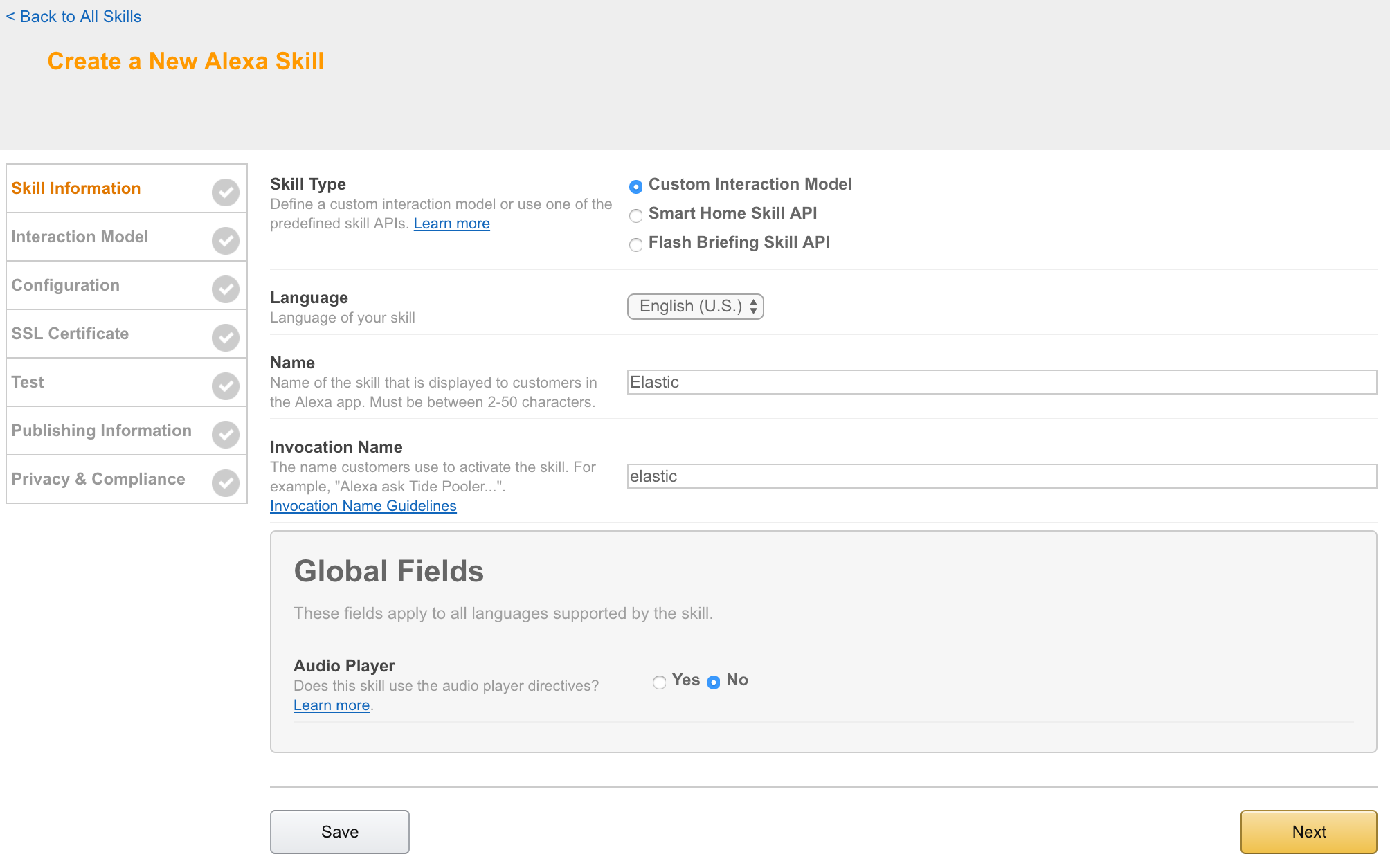
    Step 1: Skill information

    alt text

    Step 2: Interaction model

    alt text

    Text entered:

    speechAssets/IntentSchema.json
    speechAssets/SampleUtterances.txt
    

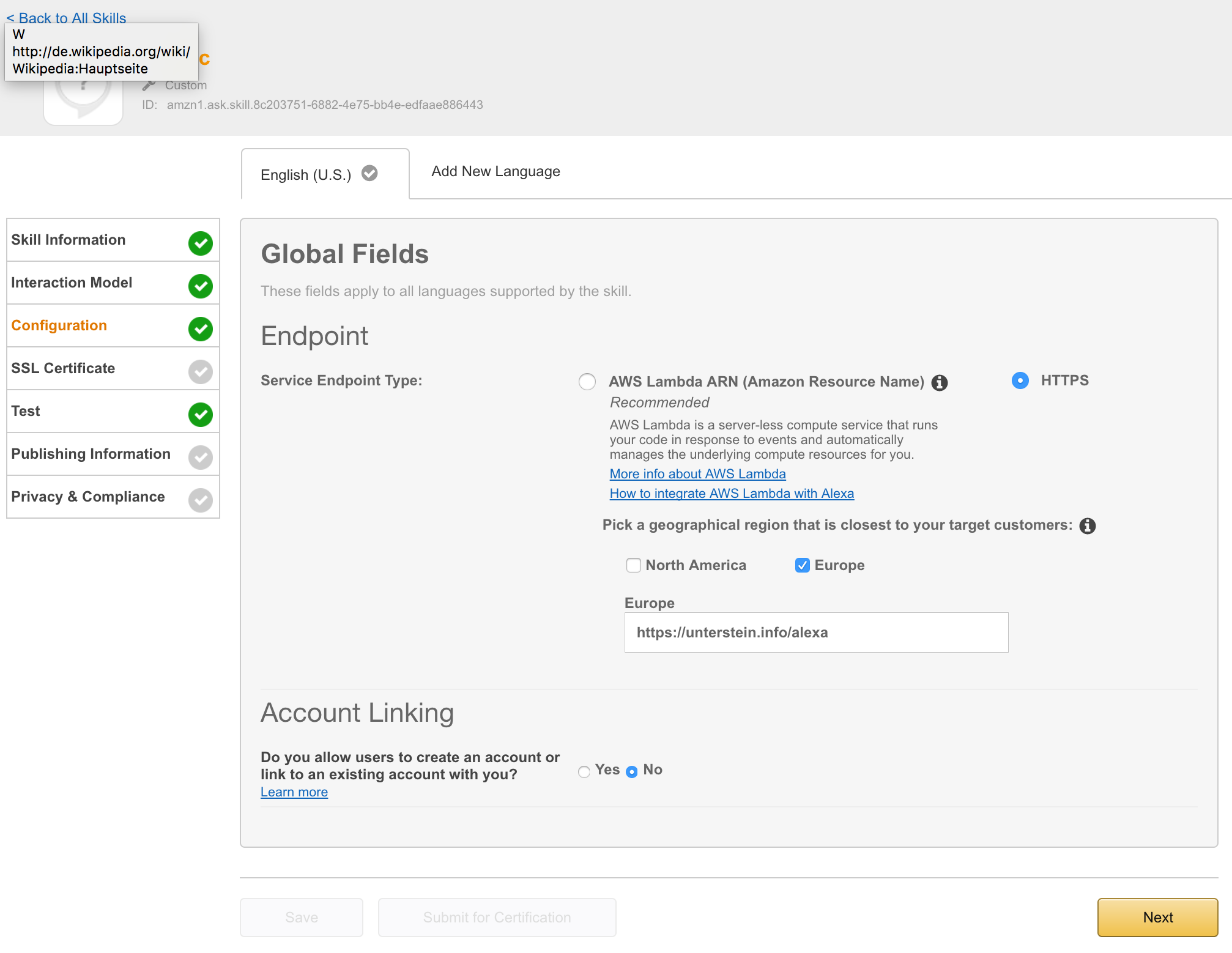
    Step 3: Configuration

    alt text

    I needed an http endpoint with valid ssl certificate. You can choose between onprem installation or AWS lamba. I decided to deployed the app directly to my server, proxied behind NGINX using the following configuration:

    server {
            listen 443 ssl;
            server_name unterstein.info;
    
    ...
    
            ssl_certificate      /etc/nginx/ssl/unterstein.info.crt;
            ssl_certificate_key  /etc/nginx/ssl/unterstein.info.key;
    
    ...
    
            location /alexa {
                    proxy_pass http://127.0.0.1:19002/alexa;
                    proxy_set_header Host $host;
                    proxy_set_header X-Real-IP $remote_addr;
                    proxy_set_header X-Forwarded-For $proxy_add_x_forwarded_for;
            }
    }


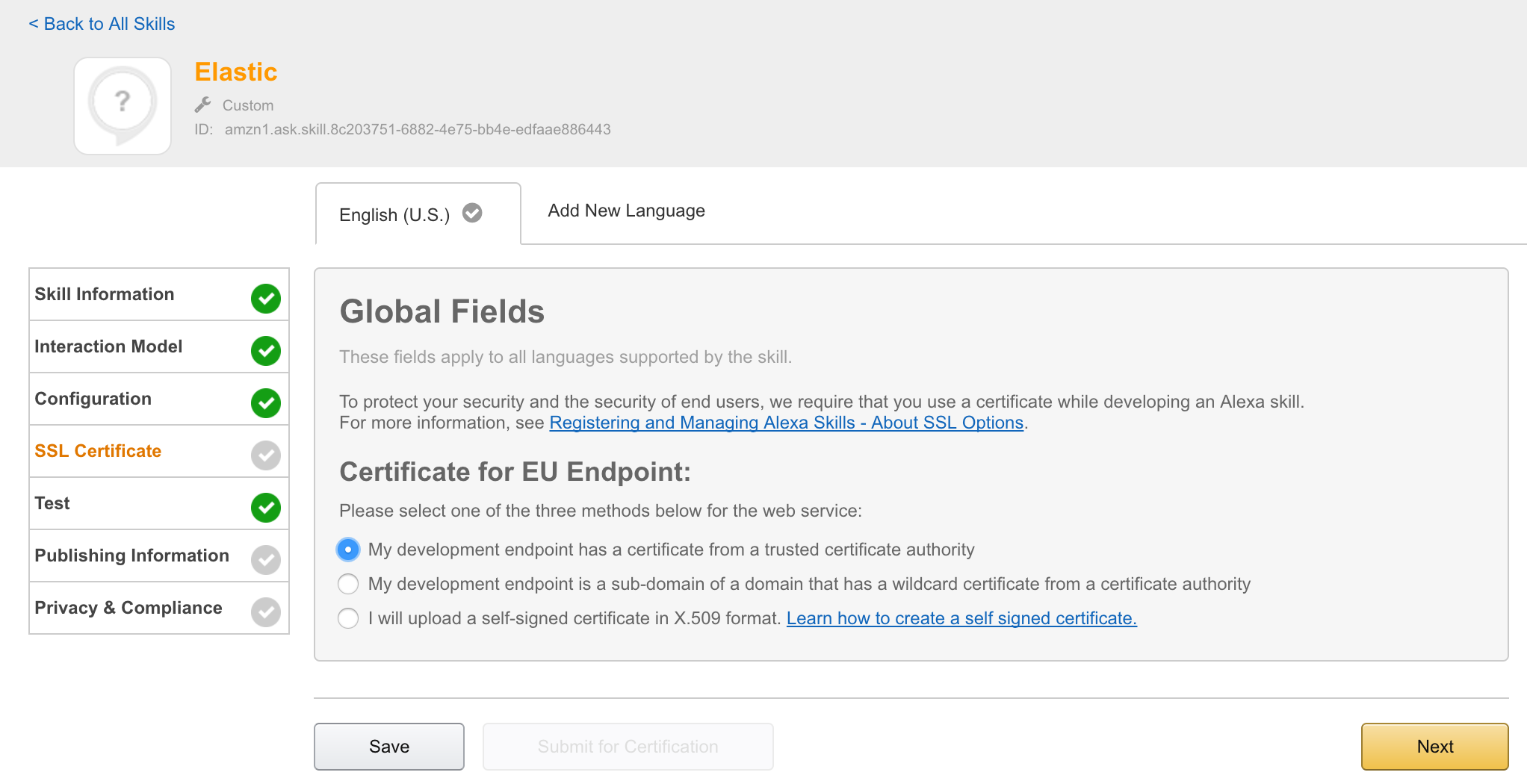
    Step 4: SSL Certificate

    alt text

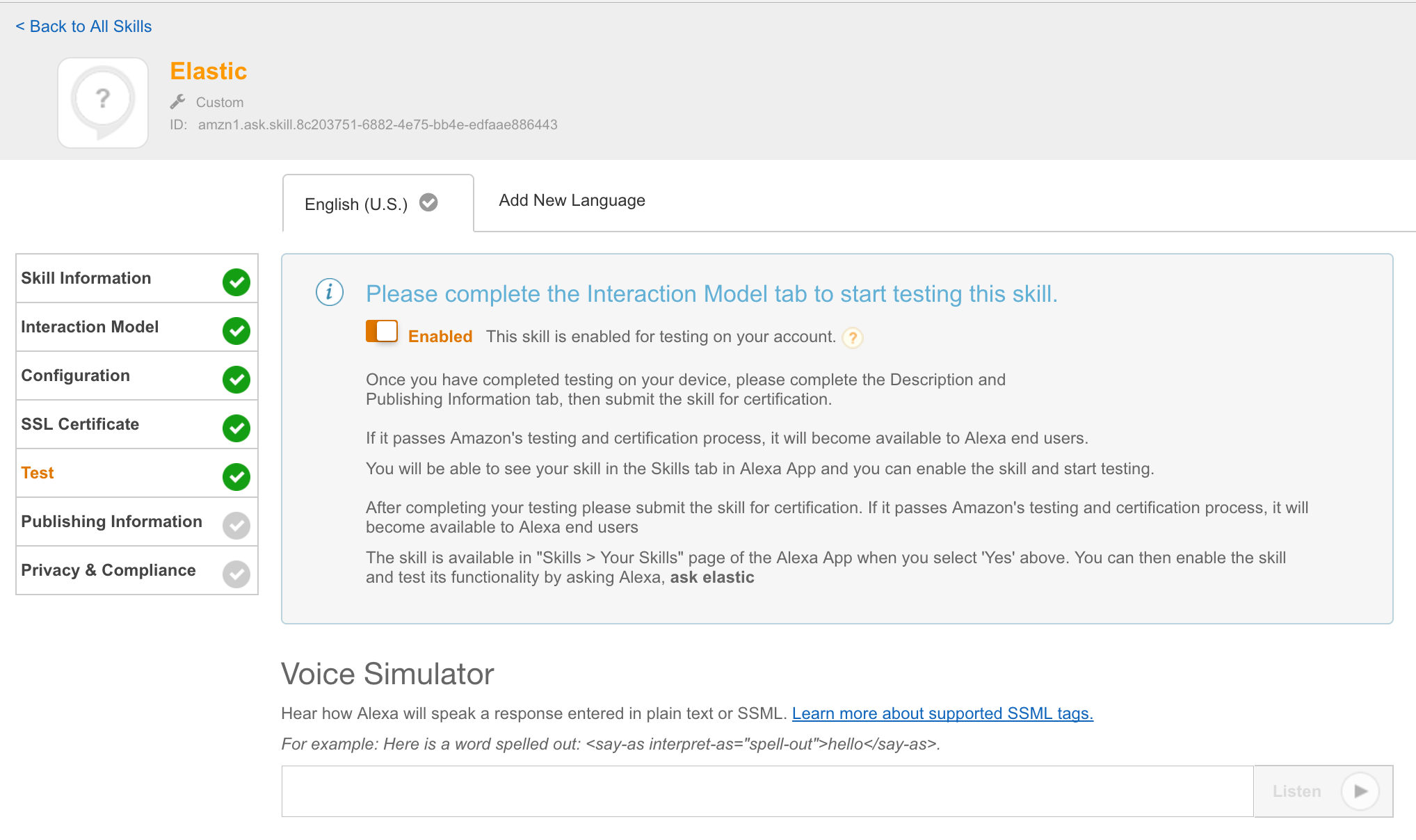
    Step 5: Test

    alt text

    At this point it is possible to enable this skill for all amazon echos, registered to the current amazon account and can be used directly.

    Short demo video

    https://twitter.com/unterstein/status/832302202702196736

    Useful reads

    Open issues

    Visit original content creator repository
  • OTP-Raspberry-Pi

    Generatore chiavi casuali

    È stato pensato per monitorare i dati ambientali attraverso una raspberry ed introdurre l’entropia sufficiente nel programma.

    Quello che viene eseguito è un ciclo infinito per incrementare una variabile in un range fissato e leggere lo stato della variabile
    quando si verificano le condizioni ambientali stocastiche come piccole variazioni della pressione atmosferica.

    Viene cosi prodotta una sequenza casuale, dimostrabile attraverso l’istogramma delle frequenze si osservano solo distribuzioni uniformi sulle chiavi generate.

    One-Time-Pad

    È il tentativo di implementare un cifrario a flusso di tipo OTP attraverso il fix delle falle crittografiche del noto RC4, cercando di far coesistere la sicurezza dei cifrari OTP alla praticità dei cifrari più moderni come AES.

    Un cifrario OTP è un cifrario perfetto perchè è matematicamente sicuro.

    L’idea di base è quella di usare il cifrario Vigenere, insicuro di per sè, ed imporre particolari condizioni sulle chiavi per creare un nuovo cifrario, di tipo OTP, chiamato Vernam.

    Le condizioni sono:

    1. chiave crittografica lunga quanto il testo in chiaro
    2. casualità della chiave
    3. ad ogni testo in chiaro da cifrare deve corrispondere una chiave diversa (One Time Pad)

    Il cifrario cosi definito resiste anche al bruteforce delle chiavi con potenza di calcolo infinita, perchè implementa il concetto di crittografia negabile, in quanto nel processo di crittoanalisi si estrarrebbero tutti i possibili testi di senso compiuto e non si potrebbe dire quale messaggio sia stato veramente scambiato.

    sincVernam.py

    In sincVernam.py non si usa la matrice di Vigenere per la codifica ma l’operatore XOR per estendere l’alfabeto a tutti i char.

    Essendo il cifrario Vernam di difficile implementazione per l’onerosa gestione delle chiavi, si cerca di adottare dei compromessi.

    Il processo di crittografia è il seguente:

    1. richiesta di una password
    2. generazione dell’hash crittografico della password da usare come seed
    3. inizializzazione di un generatore di numeri peseudocasuali crittograficamente sicuro usando l’hash precedente come seed
    4. generare una sequenza di numeri pseudocasuali ma crittograficamente sicura da usare come chiave crittografica
    5. eseguire lo XOR tra testo in chiaro e chiave crittografica
    6. incrementare un contatore da appendere alla password iniziale per generare chiavi crittografiche sempre diverse
    7. iterare i passaggi precedenti su messaggi in chiaro nuovi

    Vengono quindi soddisfatte tutte le condizioni del cifrario Vernam:

    1. la prima implementando un generatore che garantisce la lunghezza della chiave con il minimo sforzo
    2. la casualità non c’è per consentire di ricavare le chiavi crittografiche a partire da una password, ci si avvicina alla sicurezza OTP per l’uso di un generatore pseudocasuale crittograficamente sicuro
    3. per ogni nuovo messaggio in chiaro viene derivata una nuova chiave crittografica impossibile da ricavare senza conoscere la password iniziale

    Inoltre viene calcolato un hash di integrità del messaggio ed appeso al testo cifrato.

    Si potrebbe anche appendere alla fine del testo cifrato il contatore per garantire la sincronia e poter correggere errori di sincronizzazione nel caso in cui qualche messaggio venga perso. Il valore di questo contatore può essere pubblico svolgendo il ruolo logico di salt crittografico per la derivazione di nuove password.

    Viene anche impostato un tempo di delay casuale di elaborazione dentro alle varie funzioni per mitigare attacchi di timing ed è aggiunto al messaggio in chiaro un timestamp con data e ora della cifratura per mitigare gli attacchi di replica.

    Crittoanalisi

    1. L’unica crittoanalisi nota è sulla password, punto in cui il cifrario è più vulnerabile ad attacchi di bruteforce per esempio, ritenuti mitigabili però attraverso la forza della password scelta come per altri cifrari ritenuti sicuri come AES. Si consiglia di usare il cifrario all’interno di adeguati standard e protocolli sulla gestione delle password.

    2. La crittografia negabile si ottiene trasformando il cifrario a flusso in un cifrario a blocchi che contengano un numero di char in chiaro uguali a quelli del digest dell’algoritmo di hashing crittografico usato, come per esempio sha512, e la derivazione di nuovi hash per ogni blocco di testo in chiaro.

    OTP.py

    Il programma riprende la versione fixata di sincVernam.py ed aggiunge la possibilità di usare, oltre ad una password, un file di dati casuali come chiave crittografica, bypassando a derivazione delle chiavi generate con un generatore pseudocasuale.

    La generazione di chiavi pseudocasuali subentra nel momento in cui viene esaurito il file usato come chiave crittografica, perchè ad ogni byte di messaggio cifrato o decifrato corrisponde una riduzione di un byte del file chiave tramite il suo troncamento, evitandone il reimpiego e garantendo la sicurezza OTP.

    L’uso sicuro richiede lo sviluppo di un protocollo ed un framework all’interno del quale avviene la gestione delle chiavi casuali e della sincronizzazione delle comunicazioni.

    Visit original content creator repository